Every line.
One network.
Meridian joins fiber, DSL, 4G and Starlink into one connection. It spreads traffic over every link by weight, and when a line drops it moves users to the others in seconds.
Built for networks that can’t go down.
Meridian runs as a dedicated gateway between your LAN and all your internet lines. Everything is set from one clean web dashboard, with no command line.
Health checks & failover
Ping targets checked every few seconds through each link. After a set number of failures the link is pulled and its connections are reset so clients reconnect on a healthy line at once.
Live dashboard
Per-WAN throughput graphs, latency and loss, sessions, LAN clients, CPU and memory, updated live.
PPPoE, DHCP or static
Each link speaks what your ISP needs, with automatic PPPoE redial and optional VLAN tagging for modems behind a switch.
Firewall & port forwards
Everything from the internet is blocked unless you forward it. Toggle WAN ping, hide double NAT, forward ports to LAN hosts.
Routing rules
Pin a device, a destination or a service to one WAN — banking over fiber, downloads over LTE. First match wins.
LAN & DHCP server
Hand out addresses with reservations and a local domain. Change the LAN address and the dashboard follows.
Built-in DNS cache
LAN clients resolve through the appliance; 10,000 cached answers, a minimum-TTL override and one-click flush.
Weights & standby links
Give fast links more share with weights. A weight of 0 turns a link into a hot standby that only carries traffic in an outage.
Three ways to share the load.
Choose per network. Weights set each link’s share, and a link with weight 0 stays on standby.
Per connection
Every new connection picks a WAN by weight, which gives the highest total throughput.
Sticky by client
Each LAN device stays on one WAN, for banking, games and sites that pin a session to an IP.
Sticky by client + destination
A device always reaches the same site through the same WAN, while different sites still spread out.
See every line at a glance.
A real screen from a running appliance.
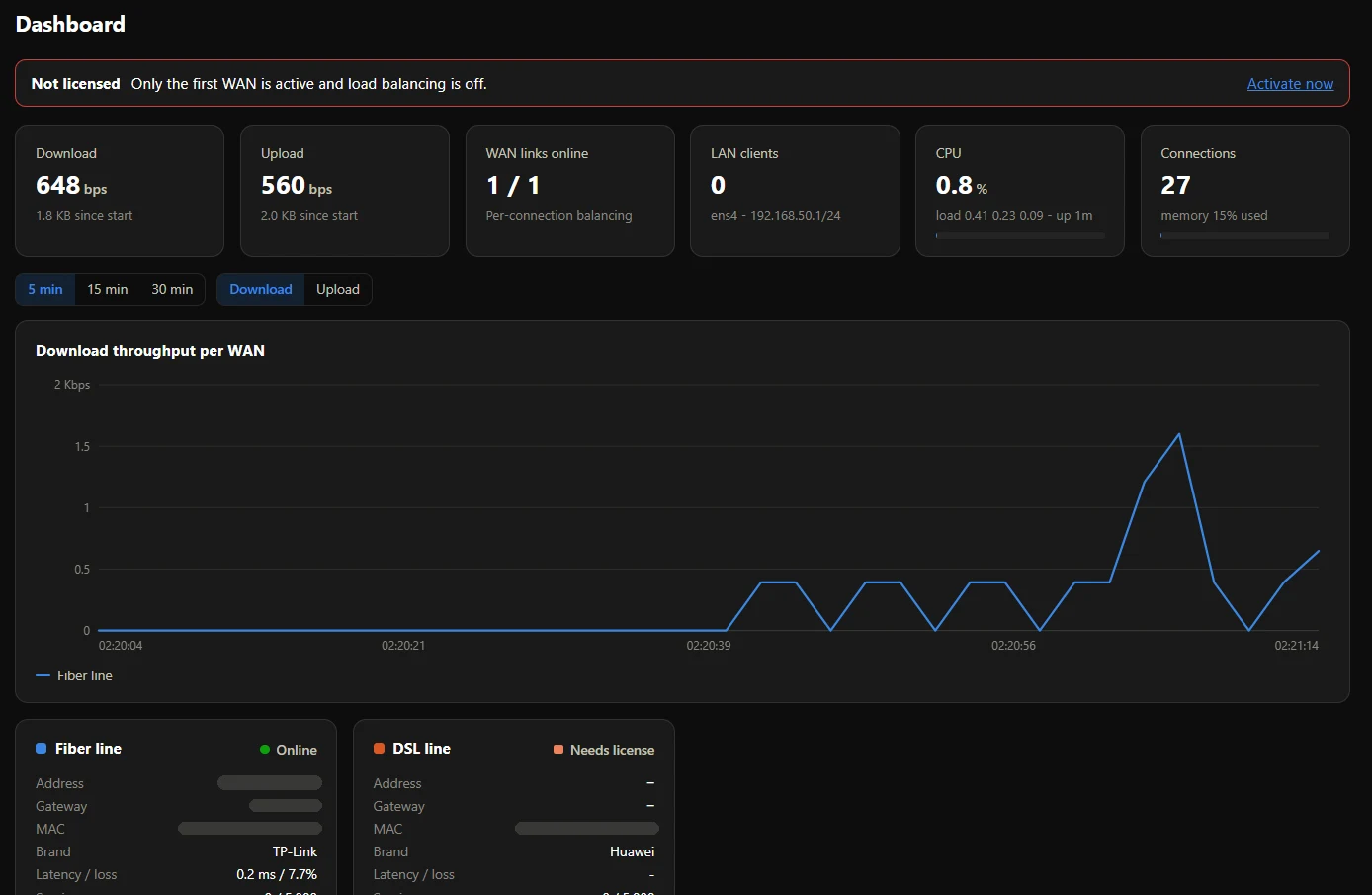
Live throughput per WAN, link status, latency and loss, sessions, LAN clients and system load.
= masked (MAC addresses and WAN IPs). Click to enlarge.Buy here. It turns on by itself.
No emails back and forth and no waiting for a vendor. Payment confirms, and the license lands on your appliance.
Start the free trial
On the appliance, open License, then Start free trial. Everything is unlocked right away. Copy the Machine ID shown there (MD-XXXX-…).
Pay with crypto
Add a plan to the cart, paste the Machine ID and pay through NOWPayments in BTC, USDT, ETH, LTC or 100+ other coins.
Applied automatically
Once the payment confirms, the appliance’s license is extended on our license server. The appliance picks it up at its next check-in with nothing to type. Without a Machine ID you get a key to paste in.
One edition. Everything unlocked.
Every license covers one appliance with unlimited WAN links and all features. Pick how long.
Loading prices…
Buy in bulk (5+ licenses) at 20% off, then assign licenses to your customers’ appliances from your own portal.
Questions
What does a license unlock?
Without a license only the first WAN runs and balancing is off. A license unlocks every WAN link, all balancing modes, failover and routing rules on one appliance for the term you buy.
Where do I find the Machine ID?
In the Meridian dashboard, go to License, then Machine ID. It looks like MD-XXXX-XXXX-XXXX-XXXX and has a Copy button. Adding it at checkout binds the license to that appliance and applies it automatically.
How fast is activation?
Licenses are issued within seconds of the payment being confirmed on the blockchain. An appliance that already has a trial or license is extended in place and picks it up at its next check-in, within 30 minutes. A new key is active the moment you paste it into License, then Activate.
I bought without a Machine ID. Now what?
You get a key like MERIDIAN-XXXX-XXXX-XXXX on your order page. Paste it into the appliance’s License page. The key locks to the first appliance that activates it.
Which coins can I pay with?
Payments go through NOWPayments, which accepts BTC, ETH, USDT (TRC20/ERC20/BEP20), USDC, LTC, BNB, TRX, SOL and many more. Prices are in USD and converted at checkout.
How do I renew?
Buy another term with the same Machine ID. The time is added on top of your current expiry, so you never lose days by renewing early.
How do I check a license?
Use Check license with either the key or the appliance’s Machine ID. It shows status, expiry and the last time the appliance checked in.